Goal: build the look of the application: a window with a heading, a table, a form and buttons. The buttons do not work yet.
Tip Weeks 6 and 7 are review and the midterm. Come back to this step fresh in Week 8. Re-read the Lecture 8 notes first.
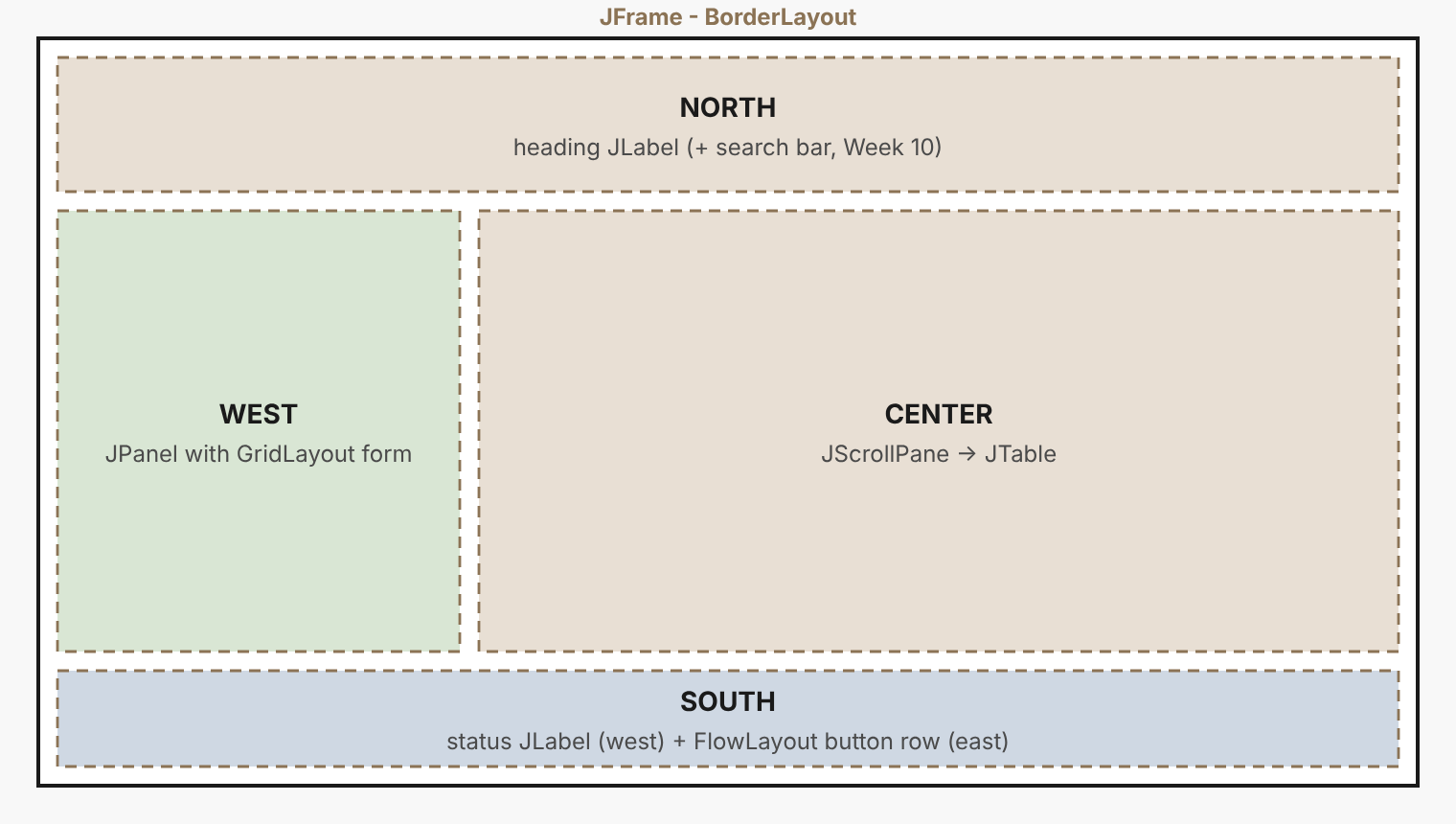
1. Plan on paper
Draw the window and write the layout manager name on every container. A good plan makes the code almost mechanical:
| Container | Layout | Contents |
|---|---|---|
| Frame | BorderLayout |
the four regions below |
| NORTH | label | bold heading |
| WEST | BorderLayout wrapper → GridLayout(0,2) form |
combo box, three text fields, Add button |
| CENTER | JScrollPane |
JTable |
| SOUTH | BorderLayout → status label (west) + FlowLayout buttons (east) |
status, Borrow, Return |
2. The frame
Read the constructor top to bottom: each block builds one region, and the end assembles them. The table is filled by refreshTable().
src/lms/ui/MainFrame.javaThe whole window
package lms.ui;

import lms.model.*;
import lms.service.Library;

import javax.swing.*;
import javax.swing.table.DefaultTableModel;
import java.awt.*;

/**
 * MainFrame - Week 8 (GUI I): layouts and widgets ONLY.
 *
 * The window is built from three layout managers:
 *   BorderLayout  - the whole window (North / Center / West / South)
 *   GridLayout    - the form (rows of label + field)
 *   FlowLayout    - the button row
 *
 * Nothing happens when you click the buttons yet. Events arrive in Week 9.
 */
public class MainFrame extends JFrame {

    private final Library library;
    private final DefaultTableModel tableModel;

    // form widgets
    private final JTextField idField = new JTextField(12);
    private final JTextField titleField = new JTextField(12);
    private final JTextField detailField = new JTextField(12);
    private final JComboBox<String> typeBox = new JComboBox<>(new String[]{"Book", "DVD", "Magazine"});

    // buttons
    private final JButton addButton = new JButton("Add Item");
    private final JButton borrowButton = new JButton("Borrow");
    private final JButton returnButton = new JButton("Return");

    private final JLabel statusLabel = new JLabel(" Ready");

    public MainFrame(Library library) {
        super("Library Management System");
        this.library = library;

        // ---- table (CENTER) ----
        String[] columns = {"ID", "Title", "Type", "Detail", "Status"};
        tableModel = new DefaultTableModel(columns, 0);
        JTable table = new JTable(tableModel);
        table.setRowHeight(24);
        table.getColumnModel().getColumn(1).setPreferredWidth(200);
        table.getColumnModel().getColumn(3).setPreferredWidth(140);
        table.getColumnModel().getColumn(4).setPreferredWidth(190);

        // ---- form (WEST) ----
        JPanel form = new JPanel(new GridLayout(0, 2, 6, 8));
        form.setBorder(BorderFactory.createTitledBorder("New item"));
        form.add(new JLabel("Type:"));    form.add(typeBox);
        form.add(new JLabel("ID:"));      form.add(idField);
        form.add(new JLabel("Title:"));   form.add(titleField);
        form.add(new JLabel("Detail:"));  form.add(detailField);
        form.add(new JLabel(""));         form.add(addButton);
        JPanel west = new JPanel(new BorderLayout());
        west.setBorder(BorderFactory.createEmptyBorder(8, 8, 8, 4));
        west.add(form, BorderLayout.NORTH);    // keeps the form compact at the top

        // ---- title (NORTH) ----
        JLabel heading = new JLabel("Library Management System", SwingConstants.CENTER);
        heading.setFont(heading.getFont().deriveFont(Font.BOLD, 20f));
        heading.setBorder(BorderFactory.createEmptyBorder(10, 0, 6, 0));

        // ---- buttons + status (SOUTH) ----
        JPanel buttons = new JPanel(new FlowLayout(FlowLayout.RIGHT, 10, 6));
        buttons.add(borrowButton);
        buttons.add(returnButton);
        JPanel south = new JPanel(new BorderLayout());
        south.add(statusLabel, BorderLayout.WEST);
        south.add(buttons, BorderLayout.EAST);

        // ---- assemble ----
        setLayout(new BorderLayout());
        add(heading, BorderLayout.NORTH);
        add(west, BorderLayout.WEST);
        add(new JScrollPane(table), BorderLayout.CENTER);
        add(south, BorderLayout.SOUTH);

        setDefaultCloseOperation(JFrame.EXIT_ON_CLOSE);
        setSize(820, 460);
        setLocationRelativeTo(null);

        refreshTable();
    }

    /** Copies the library's items into the table rows. */
    private void refreshTable() {
        tableModel.setRowCount(0);
        for (LibraryItem item : library.getItems()) {
            tableModel.addRow(new Object[]{
                    item.getId(), item.getTitle(), item.getClass().getSimpleName(),
                    detailOf(item), item.isBorrowed() ? "On loan" : "Available"});
        }
    }

    private String detailOf(LibraryItem item) {
        if (item instanceof Book b) return b.getAuthor();
        if (item instanceof DVD d) return d.getDurationMinutes() + " min";
        if (item instanceof Magazine m) return "Issue " + m.getIssueNumber();
        return "";
    }
}
3. Start it on the right thread
src/lms/GuiMain.java
package lms;

import lms.model.*;
import lms.service.Library;
import lms.ui.MainFrame;

import javax.swing.*;

/** Starts the window. Swing code must run on the Event Dispatch Thread. */
public class GuiMain {
    public static void main(String[] args) {
        Library library = new Library();
        library.addItem(new Book("B001", "Clean Code", "Robert C. Martin"));
        library.addItem(new Book("B002", "Refactoring", "Martin Fowler"));
        library.addItem(new DVD("D001", "Introduction to Algorithms", 120));
        library.addItem(new Magazine("G001", "Software Weekly", 42));
        library.addMember(new Student("M001", "Nadeesha Perera"));
        library.addMember(new Staff("M002", "Mr. Kasun Silva"));

        SwingUtilities.invokeLater(() -> new MainFrame(library).setVisible(true));
    }
}
mkdir -p out
javac -d out $(find src -name "*.java")
java -cp out lms.GuiMain
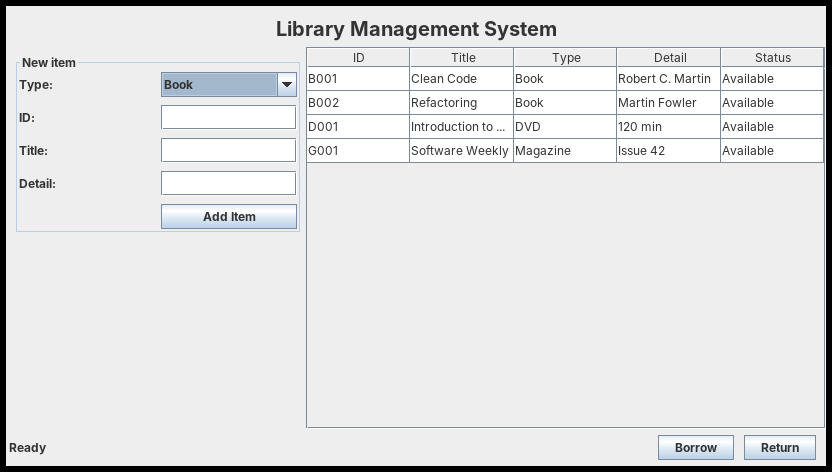
Things to try
- Resize the window: the table stretches, the form does not. Which layout decides that?
- Change
GridLayout(0, 2, 6, 8)toGridLayout(2, 0, 6, 8)and predict what happens before you run it. - Add the form directly to
WESTwithout the wrapper panel. Screenshot it and explain.
Checkpoint: is it done?
- The window opens centred and closes the program when closed
- The table shows all five columns and a header
- Form compact at the top-left; buttons at the bottom-right
docs/week8-window.pngcommitted; PR: Week 8: GUI I (Swing Layouts & Widgets)